
Skip to content
Ubermac Surf Logo Side By Side Blue
  • Home
  • Lessons & Services
    • Apple Computer, iPhone & iPad Lessons
    • ChatGPT & AI Lessons
    • HumanShield™ Scam Protection
    • Virus & Malware Removal
    • Apple Computer Setup
    • Scams & Identity Theft
    • Wireless Network Setup & Installation
    • Wireless Printer Help
    • Website Design
    • Data Recovery
    • iCloud & Synching
  • Memberships
    • HumanShield™ By Ubermac
    • Concierge Level™ By Ubermac
  • About Us
  • Contact
    • Contact Form
    • Book An Appointment
    • Blog
    • How Ubermac Works

Search suggestion

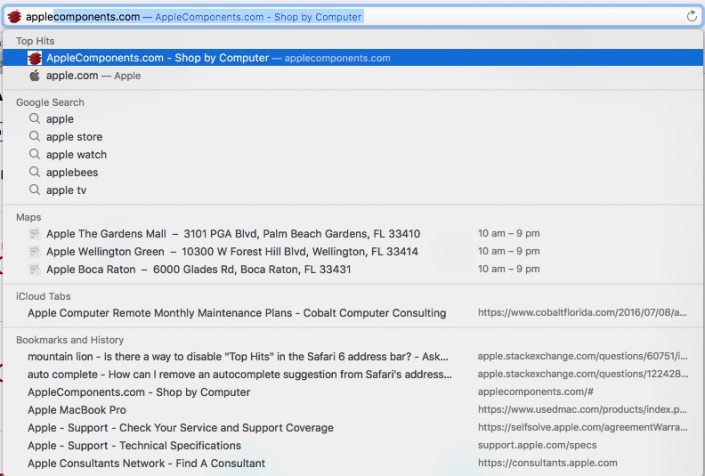
  • How To Disable Or Remove Safari “Top Hit” Autofill Search Suggestion
    How To Disable Or Remove Safari “Top Hit” Autofill Search Suggestion
    Gallery
    By schizm00|Tags: Apple, Apple Certified technician, Applecomponents.com, Autofill, Browser, Disable, Fix, history, History.db file, iMac, Internet help sites, Library, MacOS Sierra, Reboot, Remove, Safari, Safari settings, Search bar, Search suggestion, Solution, Top Hit, Troubleshooting|

    How To Disable Or Remove Safari “Top Hit” Autofill Search Suggestion

Quick Links

Lessons | Services | Website Design |Blog | About Us | Contact Us

Ubermac Surf Logo
Office Hours

November – April (Walk-Ins Welcome)
Monday-Friday : 10:00am to 5:00pm

May – October
By Appointment Only

Saturday & Sunday: Closed

See Hours & How Ubermac Works →

Contact us

1548 N Us Highway 1, Suite 103
Jupiter, Fl 33469

Text or Call Us at the number below!

561.320.4564

Page load link
Go to Top